🚀 Shopify Freight Shipping: The Ultimate Guide to Automating Your Freight & Parcel Rates
Tired of manually quoting freight for Shopify orders? Struggling with oversized shipping fees? 🚛 We’ve got you covered.
At Easy Logistics, we specialize in making Shopify freight shipping** seamless, automated, and cost-effective**. Whether you’re shipping large, heavy products via LTL freight or managing high-volume parcel orders, integrating real-time freight quotes into your Shopify checkout is a game changer. Leveraging data can significantly enhance shipping efficiency and customer engagement by providing personalized experiences and optimizing shipping rates through real-time cart analysis.
💥 What You’ll Learn in This Guide:✅ How to enable real-time freight shipping quotes in Shopify✅ Step-by-step setup for Shopify freight automation✅ How to cut oversized shipping fees & optimize costs✅ Freight API integrations** to fully automate logistics**
📢 Ready to get started? Let’s dive in!
🔍 Introduction to Shopify Freight Shipping
Shopify Freight Shipping is a powerful tool that helps merchants streamline their shipping process and save money on shipping costs. With Shopify Freight Shipping, you can access real-time shipping rates, automate shipping label creation, and track packages all in one place. This feature is designed to help businesses of all sizes, from small startups to large enterprises, optimize their shipping operations and improve customer satisfaction.
By integrating Shopify Freight Shipping, merchants can eliminate the guesswork and manual effort involved in shipping. Real-time shipping rates ensure that you always get the most accurate and competitive prices, helping you save money and offer better deals to your customers. Additionally, the automation of shipping tasks frees up valuable time, allowing you to focus on growing your business. Whether you’re shipping locally or internationally, Shopify Freight Shipping provides the tools you need to manage your logistics efficiently and effectively.
🚀 Step 1: Enable Third-Party Calculated Shipping Rates on Shopify
Before setting up freight shipping on your Shopify store, you must enable the Third-Party Carrier Calculated Shipping Rates feature.
🔹 How to enable it:
✔ Call Shopify Customer Service: 888-746-7439
✔ Use Shopify’s support links:
➡ Enable Carrier-Calculated Shipping
➡ Third-Party Shipping Rate Setup Guide
🔹 Accessing the Setting:
✔ Navigate to Shipping Page
✔ Click Manage Rates for General Shipping Rates
✔ Select ADD RATE and follow the setup steps below
✅ Once this is done, you’re ready to integrate your freight carrier!
📦 Step 2: Set Up Your Shopify Freight Carrier & API Integration
🛠️ Choose Your Freight Shipping Provider
We recommend Easy Logistics + GlobalTranz for the best real-time freight quotes & discounts with hundreds of top freight carriers.
🔹 Why Use Our Shopify Freight Shipping Solution?
✔ Live Freight Rates at Checkout – No more manual quoting
✔ Automated Freight Booking & Dispatch – Save time, scale faster
✔ Massive Carrier Discounts – Lower shipping costs
✔ Easy API Integration with Shopify
📢 Want to start shipping freight via Shopify? Let’s set up your account.
📞 Request a Freight Shipping Setup
🔑 Step 3: Request Your Freight API Credentials
Once your account is set up with Easy Logistics/GlobalTranz, you’ll receive an API key to integrate with your Shopify freight app.
🔹 How to Integrate the API Key:
✔ Upload your API Key into the GlobalTranz Shopify Freight App
✔ Your Shopify store will now pull real-time freight quotes from our carrier network
✔ Customers can select their preferred freight rate at checkout
💡 Tip: Using the Cerasis White Glove delivery rater? We can help set up API keys for White Glove freight quotes too!
📢 Need help configuring your API? Let’s set it up together!
📞 Schedule a Setup Call
⚡ Step 4: Configure Shopify Freight Shipping Plans
Your Shopify plan should match your shipping needs. You can upgrade/downgrade based on volume.
🔹 Make sure you’re logged in as the Shopify store owner to modify settings.
🔹 Next, connect the freight shipping application:
✔ Go to Connection Settings Page
✔ Select GlobalTranz or Cerasis Rater API
✔ Click Save Settings & Test Connection
✔ Once validated, you’re good to go! ✅
📢 Need help picking the right plan? Let’s find the best fit for your business.
📞 Get a Shopify Freight Consultation
🚛 Step 5: Select Your Preferred Freight Carriers
🔹 How to Choose Carriers in Shopify Freight App:
✔ Click Carriers Button
✔ Select freight carriers you trust
✔ Save preferences
💡 Pro Tip: Initially, select all carriers to ensure customers get the lowest rates. Later, refine your selection based on performance & pricing.
📢 Want expert recommendations on the best carriers? Let’s chat!
📞 Talk to a Freight Expert
📍 Step 6: Set Up Warehouse & Drop-Ship Locations
To ensure accurate freight quotes, configure where your shipments originate from.
🔹 Two ways to manage shipping locations:
✔ Use Shopify Locations Feature to define warehouse & drop-ship points
✔ Use the Freight App’s Warehouse/Drop-Ship Settings
🔹 Why This Matters:
✔ Quotes are calculated based on the closest warehouse to the customer
✔ Faster delivery = happier customers!
📢 Let’s set up your warehouse & drop-shipping logistics the right way.
📞 Schedule a Call
💰 Understanding Shipping Rates and Costs
Shipping rates and costs can be complex and vary depending on several factors, including package weight, dimensions, destination, and shipping carrier. Shopify Freight Shipping provides merchants with access to real-time shipping rates from top carriers, allowing them to compare prices and choose the best option for their business. This transparency helps merchants make informed decisions and manage their shipping budgets more effectively.
With Shopify Freight Shipping, you can take advantage of several features designed to help you control shipping costs:
Real-time shipping rates: Get instant access to shipping rates from top carriers like USPS, UPS, and FedEx, ensuring you always have the most up-to-date information.
Shipping rate estimates: Estimate shipping costs based on package details and destination, helping you plan and budget more accurately.
Shipping label creation: Automate the creation of shipping labels, saving time and reducing the risk of errors from manual entry.
Package tracking: Track all your packages in one place, keeping your customers informed about their delivery status and enhancing their overall experience.
By leveraging these features, merchants can optimize their shipping operations, reduce costs, and provide a better service to their customers.
🚀 Step 7: Automate Freight Quotes & Optimize Real Time Shipping Rates
The Easy Logistics/GlobalTranz Freight App lets you customize how freight rates appear at checkout.
🔹 Choose Your Freight Quote Preferences:
✔ Fastest Transit Time – Only show fastest carrier options
✔ Most Economical Carrier – Show the cheapest freight option
✔ Average of Cheapest Options – Display an average of the best rates
🔹 Advanced Freight Quote Customization:
✔ Show Delivery Estimates? ✅ Yes
✔ Guaranteed Freight Shipping Options? ✅ Yes
✔ Detect Residential Addresses Automatically? ✅ Yes
✔ Auto-include Liftgate Service? ✅ If shipping large, heavy products
📢 Want to fine-tune your freight quotes? We’ll help you optimize your settings.
📞 Request a Freight Quote Audit
🛒 Displaying Shipping Rates at Checkout
Displaying shipping rates at checkout is an essential feature for any e-commerce business. Shopify Freight Shipping allows merchants to display shipping rates at checkout, giving customers a clear understanding of shipping costs and helping to reduce cart abandonment rates. When customers know exactly what they will be paying for shipping, they are more likely to complete their purchase.
With Shopify Freight Shipping, merchants can:
Display shipping rates: Show shipping rates at checkout, including estimated delivery times and costs, so customers can make informed decisions.
Offer free shipping: Provide free shipping on orders above a certain amount or on specific products, incentivizing larger purchases and increasing customer satisfaction.
Set shipping thresholds: Establish shipping thresholds to offer discounted or free shipping on orders above a certain amount, encouraging customers to add more items to their cart.
Customize shipping options: Tailor shipping options to fit your business needs, including selecting preferred shipping carriers, setting rates, and defining delivery times.
By offering transparent and flexible shipping options at checkout, merchants can enhance the shopping experience, build trust with their customers, and ultimately drive more sales.
🚚 Final Mile & White Glove Delivery Options
If you offer premium delivery services, configure:
🔹 White Glove Delivery Options:
✔ Threshold Delivery – Drop-off at first dry area
✔ Room of Choice Delivery – Customer selects location
✔ Premium Service – Inside delivery + assembly + debris removal
🔹 Final Mile Freight Options:
✔ Offer Local Freight Delivery based on ZIP code or distance
✔ Enable in-store pickup for local customers
📢 Need White Glove or Final Mile shipping setup? Let’s handle it for you.
📞 Schedule a Consultation
💡 Shopify Freight Shipping Best Practices
✔ Use CSV Utility for Bulk Updates – Update freight shipping settings fast
✔ Enable Auto-Quote for Freight Orders – Never leave a customer guessing on costs
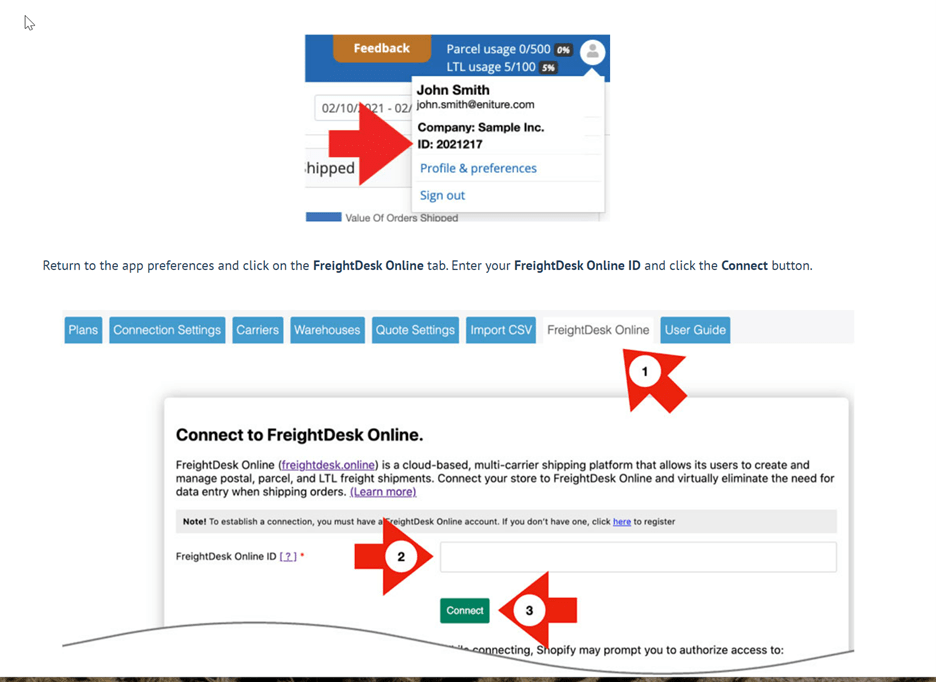
✔ Integrate FreightDesk Online – Streamline parcel & LTL freight quotes
🔹 FreightDesk Online:
✔ Automates freight booking & tracking
✔ Connects with over two dozen LTL carriers
✔ Syncs directly with Shopify for true “Click & Ship” logistics
📢 Want to automate everything? Let’s connect your Shopify store to FreightDesk Online.
📞 Set Up FreightDesk Now
🚀 Let’s Automate Your Shopify Freight Shipping Today!
🔥 3 Ways to Get Started:
✅ Get a Free Freight Quote – Compare real-time rates instantly
✅ Schedule a Freight Consultation – Let’s optimize your logistics
✅ Connect Your Shopify Store to Our Freight API – Fully automate your shipping
🚚 More sales. Less shipping hassle. Let’s make it happen!

It can take some time for Shopify to pull the list of apps that are capable of providing shipping quotes/rates to your store. Then hit ADD RATE page and follow the instructions below
- Select the shipping rate app from the drop-down list you want to enable
- Enable the Services by selecting the app preferences setting. Click the Done button and continue to the next step


Connect the freight shipping application to the API:
Use the Connection Settings Page to establish the app’s link to either the GlobalTranz or Cerasis Rater API . Enter the information requested and select Save Settings. Then click the Test Connection button. You should then see a message when your credentials are validated.


Set up your warehouse and Drop Ship Locations


Configure your Desired Freight Quote Settings


Enter Product Settings for Freight Shipping: